
How to spot whitening, print lines and surface wear before you grade
Most cards miss a 10 for small things you can find yourself: white specks on corners and edges, faint print lines, scratches that only show at an angle, and off-centre borders. Check them under a bright light, at an angle and close up — the back edges first, because that's where wear shows most.
Updated 2026-10-18 · Standards quoted from PSA, Beckett, CGC and SGC
Whitening, fraying and chipping.
Whitening is where the coloured border wears away and the white card stock shows through — usually as tiny specks on the corners and along the back edges, which are often a dark colour that makes it easy to see.
- Where to look: all four corners and all four edges, front and back. Take the card out of its sleeve — sleeves hide edge wear.
- How it grades: a PSA 10 needs four perfectly sharp corners; "the slightest fraying at one or two corners" is typical of a PSA 8. Beckett allows "only specs of wear visible under magnification" on edges at 9.5.
Print lines, scratches and dents.
- Print lines are thin lines from the printing process, most visible on holo and metallic areas. SGC's Gem Mint 10 requires no print lines; Beckett allows one faint, unobtrusive metallic print line at 9.
- Scratches and scuffs show when you tilt the card under a light. Beckett's 9.5 and 10 must be free of scratches; SGC allows a small surface scratch at 9.
- Dents and indentations catch the light as small bumps or pits — tilt the card slowly and watch the reflection.
- Print spots and staining: CGC's Gem Mint 10 must be free of print spots; a PSA 10 must be free of staining of any kind.
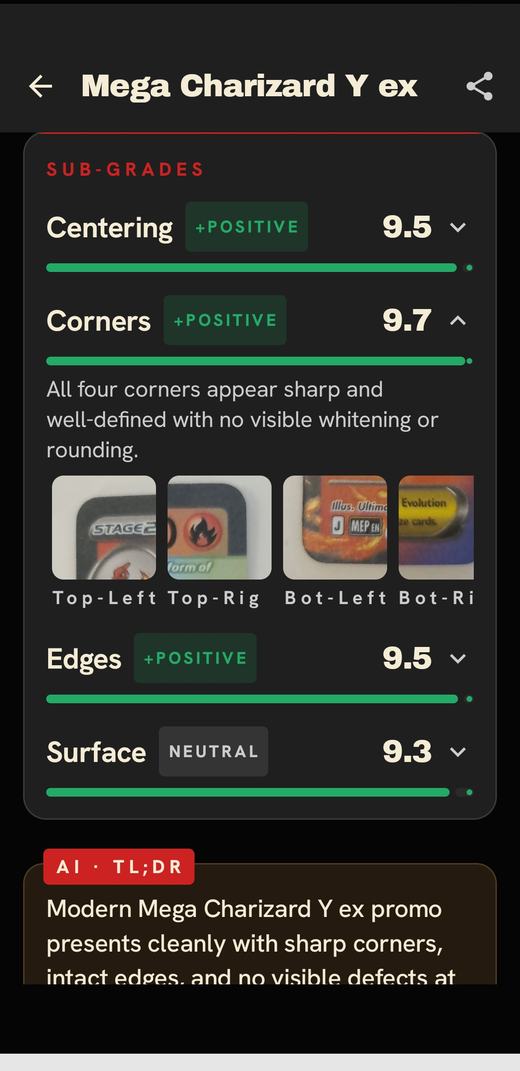
Cardinal's pre-grade reads corners, edges and surface from several angles and shows a close-up crop behind each score, so you can see exactly what it found.
Don't forget the borders.
Off-centre borders are the most common reason a card misses a 10. Compare the border widths left to right and top to bottom: PSA's Gem Mint 10 allows about 55/45 on the front and 75/25 on the back. See the PSA grading scale for every grade.
A quick routine
- Wash and dry your hands; handle the card by the edges.
- Under a bright light, check the back edges and corners for white specks.
- Tilt the card slowly to catch scratches, print lines and dents on both sides.
- Compare the border widths for centering.
- Scan it with Cardinal for a pre-grade across all four attributes.
See what the grader will see.
Scan your card for close-up crops of corners, edges and surface. Free on iPhone and Android.